Using Powershell with Splunk

Splunk Powershell Resource Kit is a convenient and very capable wrapper over Splunk REST API. You can use the Powershell commandlets exposed by this resource kit to deploy, check and manage splunk services as well as execute splunk searches. In this post, you will be introduced to the Splunk Powershell Resource Kit, you will learn how to use powershell commandlets to connect to a splunk instance and execute searches.

1. First, you will need to download the resource kit from github.
2. Installation is very simple. All you have to do is download and extract the files from the zip archive and double click on install.bat to install the splunk powershell module.
3. Open Windows Powershell console from Windows Start menu.
4. Verify that the Splunk module is installed by executing Get-Module commandlet.

Get-Module SplunkSearch

5. Import splunk resource kit commandlets using Import-Module command.

Import-Module -Name Splunk

6. Next, you need to use Get-Credentials and then Connect-Splunk commandlets to connect to splunk. You need to do this once per session or if you need to switch to a different splunk instance.

$credential = Get-Credential
Connect-Splunk -Credential $credential -ComputerName localhost

I have a local Splunk Enterprise instance running on my machine, so I am using localhost as the ComputerName to connect to it. If you have a SplunkCloud subscription you can use YourSubscriptionId.splunkcloud.com as the ComputerName to connect to your subscription. Like so –

Connect-Splunk -Credential $credential -ComputerName MySubscription.splunkcloud.com

7. Next, use Search-Splunk commandlet to execute searches –

Search-Splunk -Search "Error"

Here is a sample script:

$lastDay = ( get-date ).addDays( -1 ).toString( ‘s’ )

$searches = @(
    "ERROR"
    , "source=""tutorialdata.zip:*"" ERROR"
    , "CreditDoesNotMatch"
    ,"source=""tutorialdata.zip:.\\www3/access.log"" productId=WC-SH-G04"
)

Write-Output $lastDay
foreach($search in $searches)
{
    $qry = $search + " | stats count"
    Write-Output $qry
    Search-Splunk -Search $qry -StartTime $lastDay | Select-Object -ExpandProperty Count
}

The sample script executes multiple Splunk searches and outputs the count of results matching these search queries. Note that I am “-StartTime” parameter to scope the search to a narrower time window and “stats count” command to get the count of results. You can get this sample script as a github gist.

You can also use -EndTime and –MaxReturnCount to further constrain the query results and Format-List, Format-Table, Format-Wide commands to format the results. You can learn more about other Search parameters as well as other capabilities exposed in the resource kit documentation.

Resources :

  1. Splunk Powershell ResourceKit
  2. Splunk Powershell ResourceKit on github
  3. Splunk Powershell ResourceKit Documentation

Image credit : terminal by Andrea Mazzini from the Noun Project
PackRaft with Xamarin and Microsoft Azure

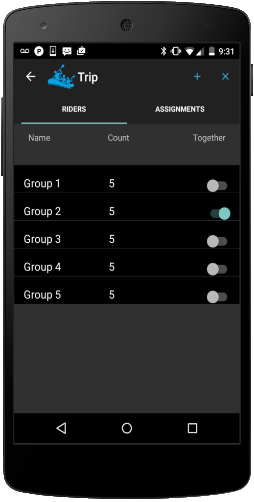
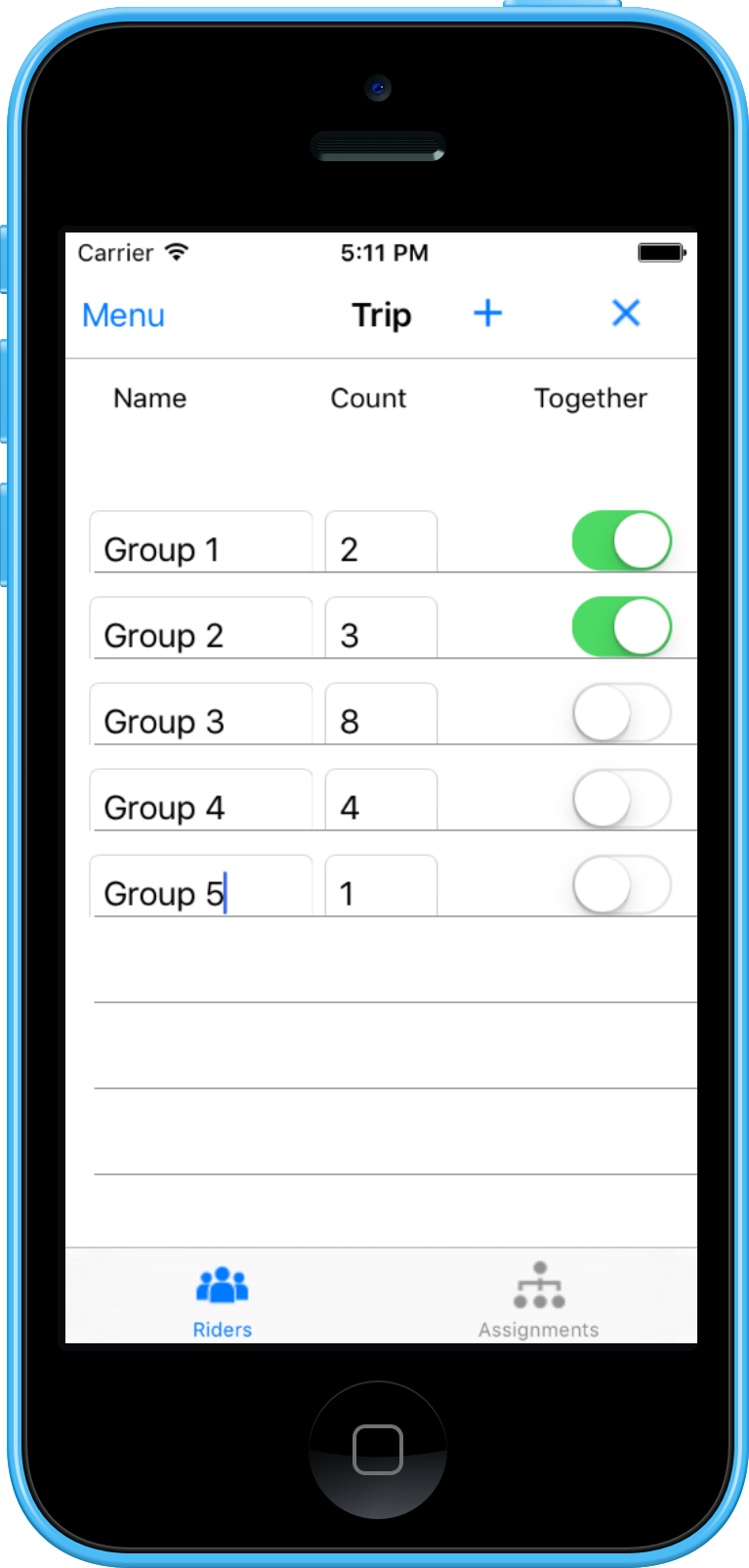
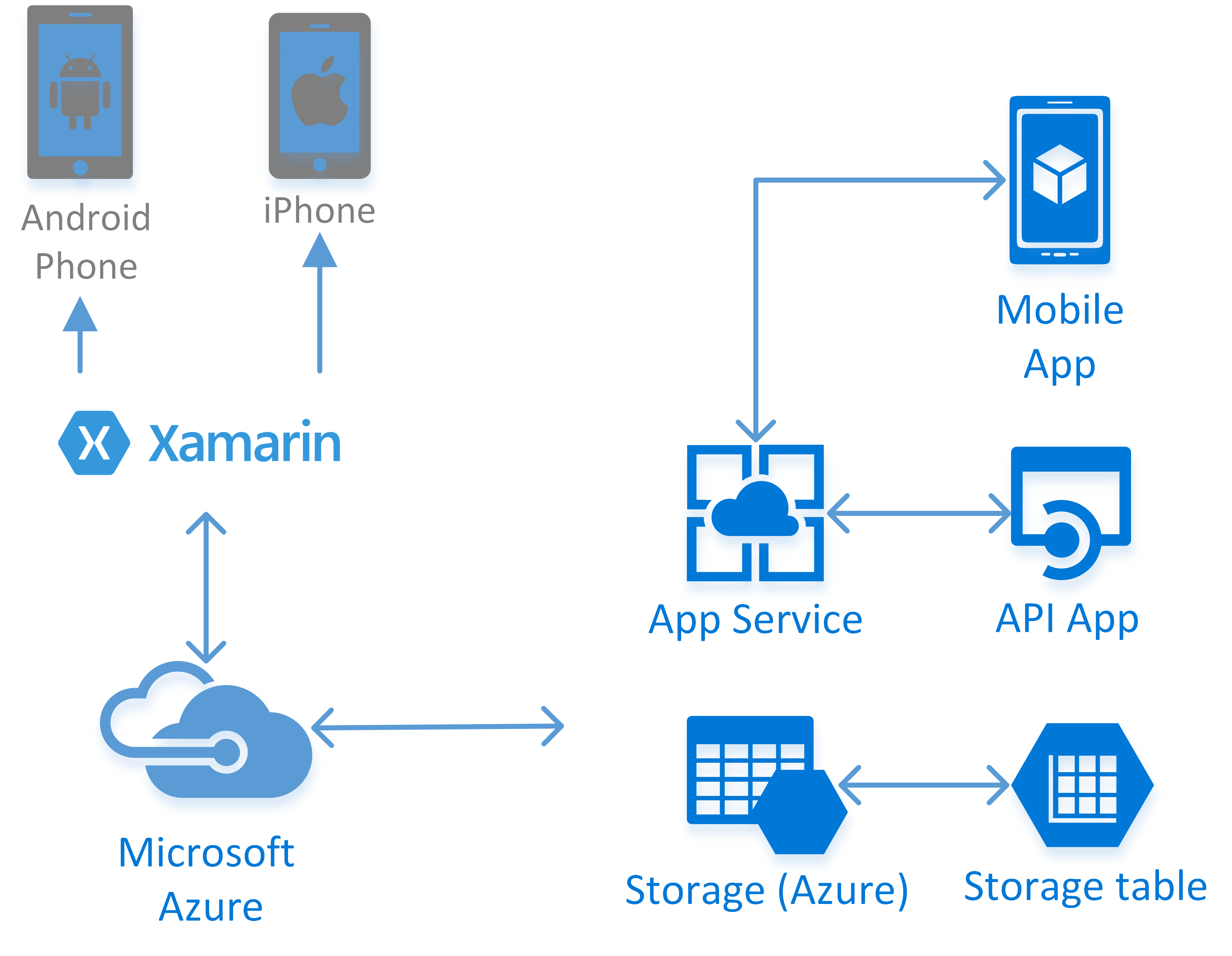
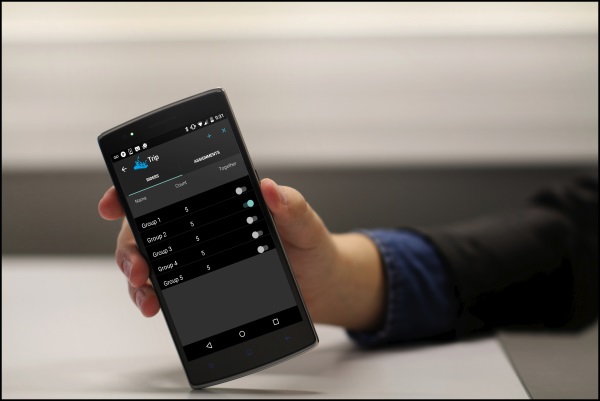
PackRaft is a cross-platform mobile application built with Xamarin. It integrates with Microsoft Azure services, such as Azure Table Storage and Azure App Service. It is created with Xamarin.Forms for iOS and Android (Windows version will be coming soon).

packraft-android-riders   packraft-iphone-assignments

The purpose of creating this sample application was to expand expertise in cross-platform mobile development with Windows Azure integration, specifically with Xamarin.Forms and Azure App Service. With Xamarin.Forms, it is possible to achieve close to 100% code reuse across these platforms for certain type of apps. Azure App Service provide a set of rich cloud backend services for your mobile applications.

PackRaft-Platform

PackRaft allows the user to setup a fleet of vehicles of various seating capacities. Groups of riders are assigned to these rides according to the count of riders in each group. You can specify that certain groups be kept together on a single vehicle – and the app tries to honor those requests if possible. I did this via a rudimentary implementation of a bin packing algorithm. This implementation is deployed as an API App in Microsoft Azure.

PackRaft uses Azure Mobile Services SDK to persist Fleet data to Azure Table Storage and to authenticate users with Facebook and Microsoft accounts. Twitter and Google account authentication is also supported by Azure Mobile Services SDK out of the box and those will also be enabled in PackRaft soon.

PackRaft is available on Android, iPhone and iPad.
Get it on Google Play

Download iOS app on App Store

Does Xamarin have a future?

Xamarin‘s cross-platform mobile application framework has Xamarin.iOS and Xamarin.Android at its core. Both Xamarin.Android and Xamarin.iOS are based on Mono. Mono is an open source implementation of .NET (CLI and CLS). Xamarin’s customers are Microsoft (.NET) shops. Microsoft is open sourcing .NET itself. What does all this mean for Xamarin?

Is Xamarin’s competitive advantage going to be undermined by the open source .NET? Microsoft’s Universal Application Platform (UAP) and the promise of making .NET applications run on Mac and Linux seems to indicate that Microsoft may be emerging as a threat to Xamarin.

The formidable Microsoft has perhaps spelled death for Xamarin by standing up a competitor to Mono. If you are a developer getting started with Xamarin or already using Xamarin, should you be worried? After all Xamarin has a significant learning curve. Just because you are proficient with C# and Visual Studio does not mean that learning curve of cross-platform development with Xamarin is insignificant. I have worked with Xamarin platform for more than two years. As you get into Xamarin development, you quickly realize that you need to know and learn quite a lot about the platforms that you are developing for. So, should you put your time and money into Xamarin? Should you (continue to) invest in Xamarin? Does Xamarin have a future?

Xamarin’s core competitive advantage is not in competition with the (.NET Core) class libraries, SDKs and server frameworks being open sourced by Microsoft. Xamarin’s competitive advantage is in the ecosystem of development and testing tools as well as infrastructure that supports cross-platform mobile development, testing and monitoring. Xamarin marvelously simplifies creation of native apps on iOS and Android using C# (now F# also). The pace of innovation at Xamarin is breathtaking. There is nothing quite like it to enable cross-platform development of native mobile applications with Microsoft’s flagship programming language at its core and the incredible productivity allowed by Microsoft’s and 3rd party tool set.

I think both Microsoft and Xamarin are going to greatly benefit from the formation of .NET Foundation and open sourcing of .NET as well as cross-platform implementation of .NET. Keep in mind that while Mono is open source, Xamarin.Android and Xamarin.iOS are commercial products. Xamarin is going to benefit immensely by Mono closing the gaps with .NET BCL implementation and converged implementations of Mono and .NET in the near future, without giving up its core competitive advantages. Microsoft has seen the writing on the wall – The future belongs to Cloud and Mobile. Microsoft has a strong presence in Cloud, but not so much in Mobile. Microsoft is going to benefit from .NET running on Mac and Linux by expanding their customer base to those platforms in its cloud offerings in Azure. But Xamarin’s gains are also going to translate into broader and deeper mobile market penetration for Microsoft’s tools and technologies, benefiting Microsoft’s Cloud strategy even further. Xamarin’s success is strategically important to Microsoft. Now even more so.

I think that Xamarin will continue to gain strength and remain a viable cross-platform development framework as far as I can see. Xamarin’s future looks very bright to me.

Creating Android Apps using C# and Xamarin

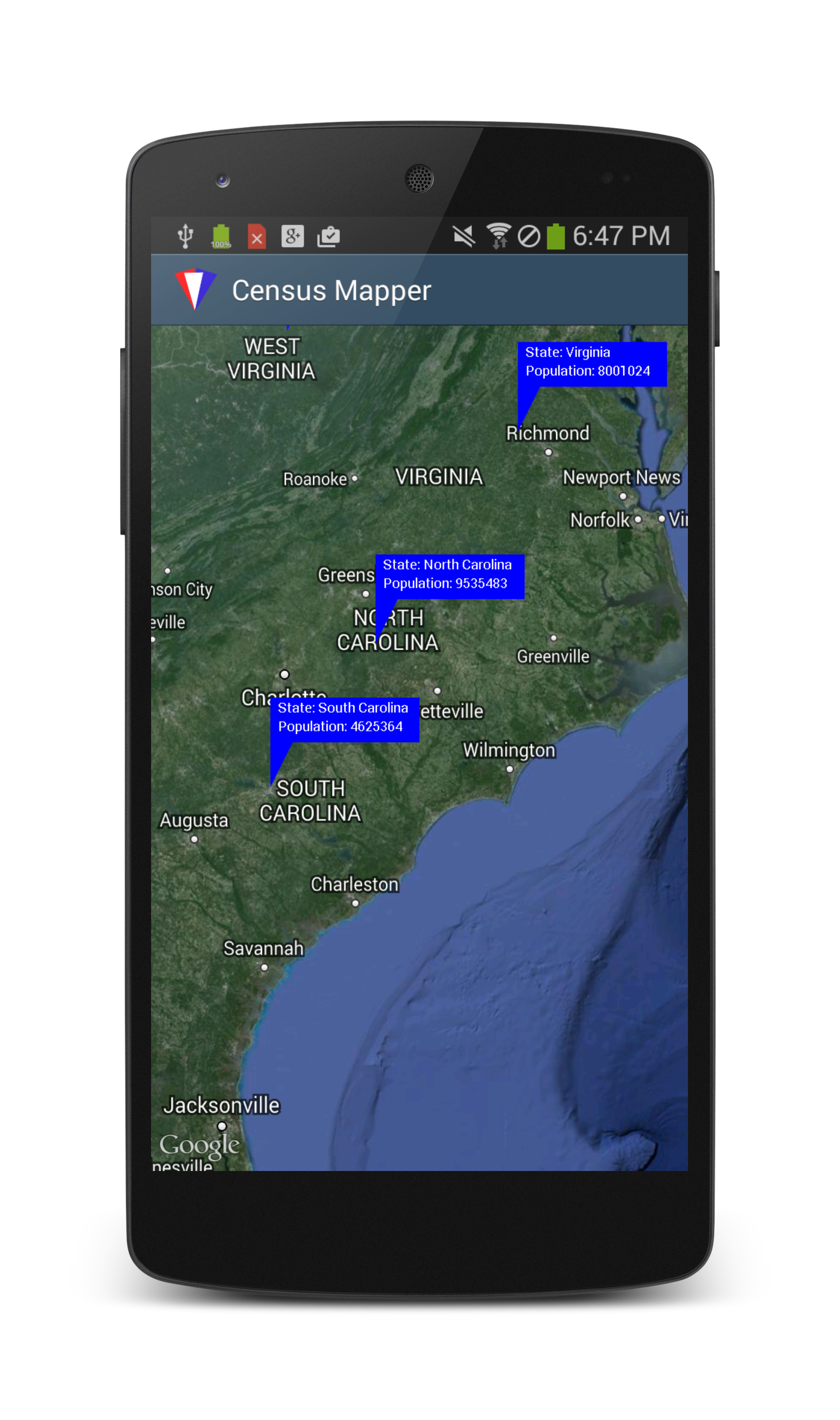
You can create native Android and iOS applications using C#, with Xamarin. I explored the capabilities of Xamarin tools and the development experience with Xamarin to create an Android version of CensusMapper. CensusMapper displays U.S. Census data on a Map. I created the original application for Windows 8 (WinRT) using C#. I have since converted it to an MVVM (C#) application, HTML/Javascript (WinJS) version and more recently to a Universal Windows App running on Windows Phone 8.1 and Windows 8.1. In that tradition, now it is faithfully ported to run on Android devices, using C# and Xamarin. CensusMapper is available on Google Play Store.

censusmapper-android-on-nexus5

CensusMapper.Android shows population of each U.S. State. User can tap on a location on the map to show the population (as per 2010 census) of the zip code containing the selected location. User can select a location to view the population compared to the containing geography, as a pie-chart.

This experimental project helped me expand my cross-platform mobile application development skillset in the following areas:

  • Using Xamarin/C# to create an Android app using Xamarin Studio on a PC and a Mac.
  • Structuring C#/.NET source code in a Portable Class Library to allow reuse on Windows, Windows Phone, Android and iOS platforms.
  • Converting the functionality of an existing Windows Universal App (Windows Phone/ WinRT) to an Android app.
  • Using GoogleMaps API (via Google Play Services) to display data retrieved from U.S. Census API.
  • Using Bing Maps API for reverse geocoding in an Android app.
  • Creating custom markers using low-level API in Android.Graphics namespace to display information on the map.
  • Charting with oxyplot cross-platform charting library.
  • Working with Android SDK, AVD Manager as well as developer documentation and resources on Android and Xamarin websites in the development lifecycle of the app.
  • Publishing an app on Google Play Store.

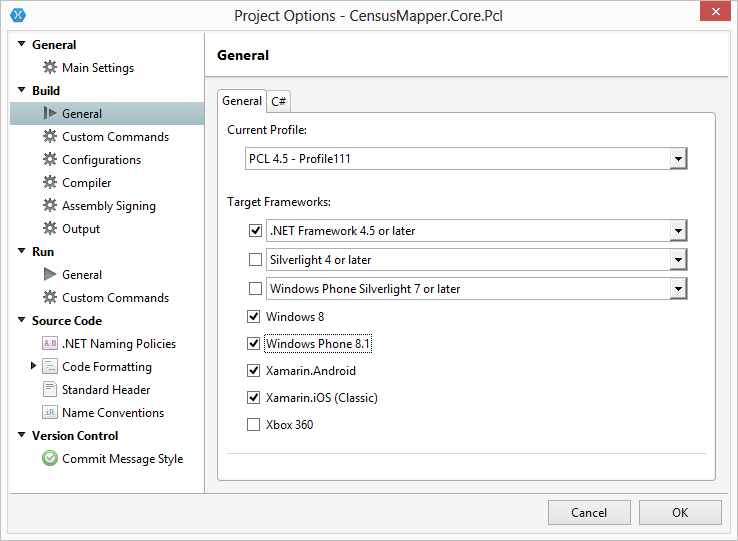
I started with Xamarin.Forms.Maps. It was quick and straight forward to create a Xamarin.Forms app. The tricky part was creating the custom markers (the shape of speech bubble) on the map, instead of using the default push-pin markers . I tried creating a CustomRender to create custom markers and built interactivity with the map elements, but it turned out to be too much hassle. All of that customization would be specific to Android platform only and not reusable on the iOS anyway. So, I decided against using Xamarin.Forms and work directly with Google Maps library. Xamarin.Forms also limits me to Windows Phone 8 compatibility in my PCL. I can’t use Windows Phone 8.1 in any PCL profile compatible with Xamarin.Forms. It also requires a minimum of Android 4.0. The PCL profile # 111 for sharing code between Windows 8, Windows Phone 8.1 as well as Android and iOS, is not compatible with Xamarin.Forms at the time of writing this.

pcl-profile-111

Don’t use the Android emulator for testing. Get a real device. I stopped using the emulator while working on CensusMapper because GooglePlayServices (GPS) dependency was making me jump through way too many hoops. Debugging map functionality on the real device was a much more productive experience. Then I discovered Xamarin’s Android Player. It is awesome. By all means, use it! It is a pleasure to work with, especially on a Mac. Don’t be discouraged by the preview/beta status. It blows the Android SDK virtual devices out of the water, in terms of performance and usability.

I tested on Google Nexus 4 (Android 4.2), Samsung Galaxy SIII (Android 4.3) , BLU Dash JR (Android 4.4) and an older Coby Kyros tablet (Android 2.2). Google Play Services update, required for the app to work, could not be installed on BLU device because of the limited storage space. You must root the device in order to install the GPS updates on an SD card. It is advisable to have a root-friendly device. Google Nexus devices are excellent development devices, allowing you root access and the ability to load custom ROMs. However, it is very important for you to get a few different kinds of devices of various form factors and Android versions/API levels for testing your app’s functional and non-functional aspects.

Android device logs and the IDE build logs are the most important tools you have to resolve problems encountered in the Android app development with Xamarin. These should be the first places to look when troubleshooting issue.

Versions used in this project:
Xamarin 3.8.
Xamarin Studio 5.7
Xamarin Android 4.20.0

Get it on Google Play

Universal Apps

The story of Windows Universal Apps is the result of advancements in three areas:

  1. The platform convergence between Windows 8.1 and Windows Phone 8.1
  2. The (ongoing) unification of Windows and Windows Phone stores.
  3. Shared Projects and other enhancements in Visual Studio 2013 Update 2 to support cross-platform development.

I have written about my experience in converting an existing Windows 8 app, CensusMapper, to a Universal App on the AIS Blog. Read the article here. I have also created another Universal App, LRMS, using Windows App Studio. This app is available in both Windows and Windows Phone Stores.

I gave a presentation at the Raleigh Code Camp this past weekend : Creating Universal Apps for Windows Phone 8.1 and Windows 8.1. Thanks to everyone who attended the presentation. The session slides for this presentation are available here : Download Slides.


Should my barber do a technology upgrade?

I noticed a barber shop sign at a local strip mall last year and stepped inside, hoping to get a haircut. The lone barber turned away from the customer in his chair, looked at me and said, “Sorry, man. It is by appointment only”. It was relatively spacious place. There were no other waiting customers there. It felt peaceful and quiet. Local NPR station was playing on the radio. I took his card and left. I got my haircut somewhere else that weekend. Over the next month or so, I called him on Saturdays, for the hair cut appointment. He was booked. Every single weekend. I wised up and called him on Friday. I got the appointment for the next day. I did not get the slot I wanted, but I picked from a couple of open slots. I showed up for my appointment, and I have been going to him ever since.

He charges a bit more than some of the other haircut places, but he does not rush to move on to the next customer and my wife is impressed by my haircuts. Enough said. The best part is that he plays NPR in the shop. All day long. I can continue listening to This American Life, All Things Considered or Snap Judgment as I get out of my car and step inside the barber shop without missing much. There is a sense of privacy and exclusivity. It is perfect! And I love it!

barber-shop

Photo Credit : https://flic.kr/p/mer3eX

He is running an appointment-only business and the probability of you getting an appointment on the same day, or a time slot of your choice is pretty much zero. He takes calls on a regular (non-smart) phone and records his appointments on a paper pad with a pen. He takes cash. There is not much of hi-technology there to speak of. One day, we started talking about technology. I asked him if he has thought about using one of the online services to help him with his business. The customers could do self-serve appointments online and he will not be interrupted on his phone while he is with his customers. Customer will get automatic appointment reminders. The payments can also be done online. He could build a database of his customers, create a following on social media and generate more business.

He knew about all of these options. But he seemed reluctant. He wants to keep it personal. He wants to talk to his customers directly, because when they talk to him and get the appointment, they show up. “There a lot of people who would love to waste my time. They will book fake appointments online and not show up.”, he said, “And I don’t want customer’s credit card numbers. I don’t have the time to deal with credit card refunds and disputes. With a larger business, when there are a few more barbers in the shop, it would make sense to hire someone to be at the front desk and handle everything being dependent on additional technology entails, but not now.” The conversation continued for a few more minutes, but his reluctance to consider upgrading to newer technology was quite evident.

He seems to have three main concerns :

  1. He wants only qualified/screened customers. He wants to keep his schedule full.
  2. He wants to keep things simple. He wants to avoid handling customer’s credit card information.
  3. He will personally need to transition to the new scheduling system. He wants an assistant to handle that.

I would recommend a gradual transition. Here is a 10 point plan to get him started –

  1. Create free accounts with some of the online scheduling services and get familiar with them. Appointy or ClickBook are a couple of services to try. They are not paying me to promote them. These are just two that stood out of many I researched.
  2. Start using a tablet device to create and update some dummy appointments. I would recommend going with a data plan with a cellular provider rather than the Wi-Fi option. It will be significantly less tech hassle for you that way. Just trust me on this.
  3. Use the online scheduling service trial for 2 weeks from the tablet device.
  4. Based on the trial experience, sign up with one of the services for a month-to-month plan.
  5. Handpick some of your regular customers and ask them to try the online scheduling service.
  6. Other customers will continue to call on your existing phone for new appointments, rescheduling or cancellations. Update the schedule on paper as well as online (using tablet).
  7. Continue to take cash. You will have the option to add online payments to the service for additional charge. You will not have to take the credit card numbers yourself.
  8. Do this for 3 months. 3 months are necessary to ensure at least two cycles with a set of customers. People tend to have haircuts every 3-6 weeks.
  9. Learn, evaluate and adapt. It is very important to plan for contingencies. What happens if the online scheduling service temporarily goes down? What if you drop and break your tablet in the middle of the day? Ditch the paper completely if you feel confident.
  10. Tell more customers about the online scheduling option and go from there.

This exercise has reinforced my position that software exists to support the business. Not the other way around. To my barber, this is serious business. This is his livelihood. As techies, we tend to impart an importance to the technology for its own sake, but transitions and upgrades (if not executed and managed carefully) could be extremely detrimental to the business.

Whether he upgrades or not, He will continue to have my business. I wish the best for him.

Update : Since I wrote this, the barber shop has moved to a new location nearby. There are other barbers in the shop now. He is still by appointment only. His partners take walk-ins. There are large flat-panel TVs on the wall that sometimes play the local NPR channel. It is a busier place than before. Although the sense of privacy and exclusivity is not there anymore, I am still going there for haircuts, for now.