Windigo 1.1 Released

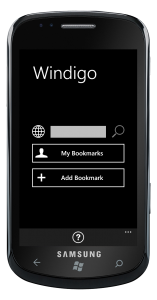
windigo-samsungWindigo is a windows phone app to access your diigo account on windows phone 7.

Create, edit and search diigo bookmarks. Slick, to-the-point interface. Browse and search public bookmarks of other diigo users. Tap on the bookmark for details, including tags. Tap on any tag to narrow your search. Trial version is available.

Windigo 1.1 is out on the windows phone marketplace now.  Highlights of this update :

- Last SearchScope used is now persistent
- Fixed search when a search term is picked from suggested words
- Problem report now includes system info
- Handle crash on navigating from main page
- Fixed feature tracking for analytics
  • Last SearchScope used is now persistent
  • Fixed search when a search term is picked from suggested words
  • Problem report now includes system info
  • Handle crash on navigating from main page
  • Fixed feature tracking for analytics

Related posts

This entry was posted in Apps and tagged , , , , , . Bookmark the permalink. Post a comment or leave a trackback: Trackback URL.

Post a Comment

Your email is never published nor shared. Required fields are marked *

*
*

You may use these HTML tags and attributes: <a href="" title=""> <abbr title=""> <acronym title=""> <b> <blockquote cite=""> <cite> <code> <del datetime=""> <em> <i> <q cite=""> <strike> <strong>

  • Twitter Updates

  • Notes

    Using DbUpdater with MySql
    DbUpdater can be used with mysql. Here are the files you need to jumpstart the integration – DbUpdater-MySql.zip 1. You might need to change the path to mysql.exe in mysql-exec.bat. 2. Modify values in mysql-sample-command-line.bat. Make sure mysql.data.dll is placed in GAC or in the same directory as DbUpdater.exe. Connector binaries can be downloaded from here - http://dev.mysql.com/downloads/connector/net/6.1.html (0)

    Online Backup Solution
    Finalized online backup solution : JungleDisk. I can run it on all of my machines without paying extra. I get to keep the ownership of my data – by using my own Amazon S3 storage. Backed up all family photos – all 30 GBs. Feeling good (0)

    Switched to Thematic
    I have switched to Thematic theme on this blog over the weekend. I created a child theme after playing around with the customization hooks. I added a widgetized area below main asides, did some css modifications and created a three column, flexible layout just the way I wanted. I am so glad I switched to Thematic. ThemeShaper forums are very helpful. These articles were just what I needed to get started : How to make a child theme for WordPress and How I used a WordPress Child Theme To Redesign My Blog. (0)

  • BookShelf

    Planned books:

    • ASP.NET MVC in Action

      ASP.NET MVC in Action by Jeffrey Palermo, Ben Scheirman, Jimmy Bogard

    Current books:

    • Pragmatic Thinking and Learning: Refactor Your Wetware (Pragmatic Programmers)

      Pragmatic Thinking and Learning: Refactor Your Wetware (Pragmatic Programmers) by Andy Hunt

    • Working Effectively with Legacy Code

      Working Effectively with Legacy Code by Michael Feathers

    Recent books:

    • How We Decide

      How We Decide by Jonah Lehrer

    • How I Got Published: Famous Authors Tell You in Their Own Words

      How I Got Published: Famous Authors Tell You in Their Own Words by Ray White

    • Programming Windows Presentation Foundation

      Programming Windows Presentation Foundation by Chris Sells, Ian Griffiths

    • Advanced MVVM

      Advanced MVVM by Josh Smith

    View full Library

Close
E-mail It