Here is a simple scenario – I have already merged changesets 45-55 from the trunk to branch b1. After this merge, more changes (56-60) were submitted into the trunk and I now need to merge those changes also to branch b1.
Which changesets do you select to merge ? 56-60, right ? Well, not exactly. It depends. If you are using Subversion merge command, you will need to specify 55-60. If you are using TortoiseSVN, you will select 56-60. You should keep this in mind if you are used to TortoiseSVN and you are attempting a merge using SVN merge command. Otherwise, you will end up with a merge without change 56.
Selecting changes to merge can become non-trivial when you don’t know which changes have already been merged. However, there is good news. With subversion 1.5, when you are selecting changes from source branch to merge into a target branch, don’t do it ! Subversion 1.5 onwards has built-in merge tracking. When using TortoiseSVN, if your intention is to merge all changes, just leave the changeset selection blank. Subversion knows which ones have already been merged and which ones to merge and it does it automatically. You can also select changes that have already been merged and those will be handled (excluded) automatically too.
There is a summary of what to expect from Subversion Merge-Tracking feature here – Subversion 1.5 merge-tracking in a nutshell.
There is detailed description of Subversion Merge-Tracking here and search for ‘mergeinfo property’ in Subversion documentation.
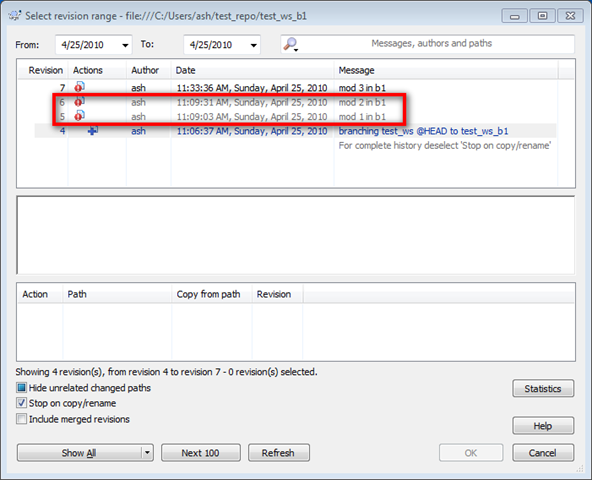
The above screen-shot shows the changes already merged in grey. Thanks to Subversion’s mergeinfo property.
So, can I just stop worrying about changesets altogether, when merging ? There are a few caveats to how mergeinfo metadata is (and sometimes not) recorded. Read this for more information – The Final Word on Merge Tracking.
Read about Subversion merging and branching here and TortoiseSVN merging documentation here – browse down to these sections : Reviewing the Merge Results and Merge Tracking.
Hi Ash – I am new to subversion and I have a question.
How can I take a group of files and apply a label to it. A label like lets say R1.0.1. Is this possible. Also, once this is applied, lets say development continues, but 10 days later i need to grab all the objects that have the label R1.0.1. Is this possible? How do I do it?
Unlike some other tools (eg – Perforce), you can not shelve named change-sets in subversion. You can, however, create patch files and apply them at a later time.